What the Dashboard Shows You
The Latent dashboard is the first thing you see when you log in. It is designed to give you an immediate overview of your film photography activity without requiring you to dig through individual records. At a glance, you can see how many rolls are currently in progress, what you have been shooting lately, and how your habits have evolved over time.
This guide explains each section of the dashboard and how to use it effectively.
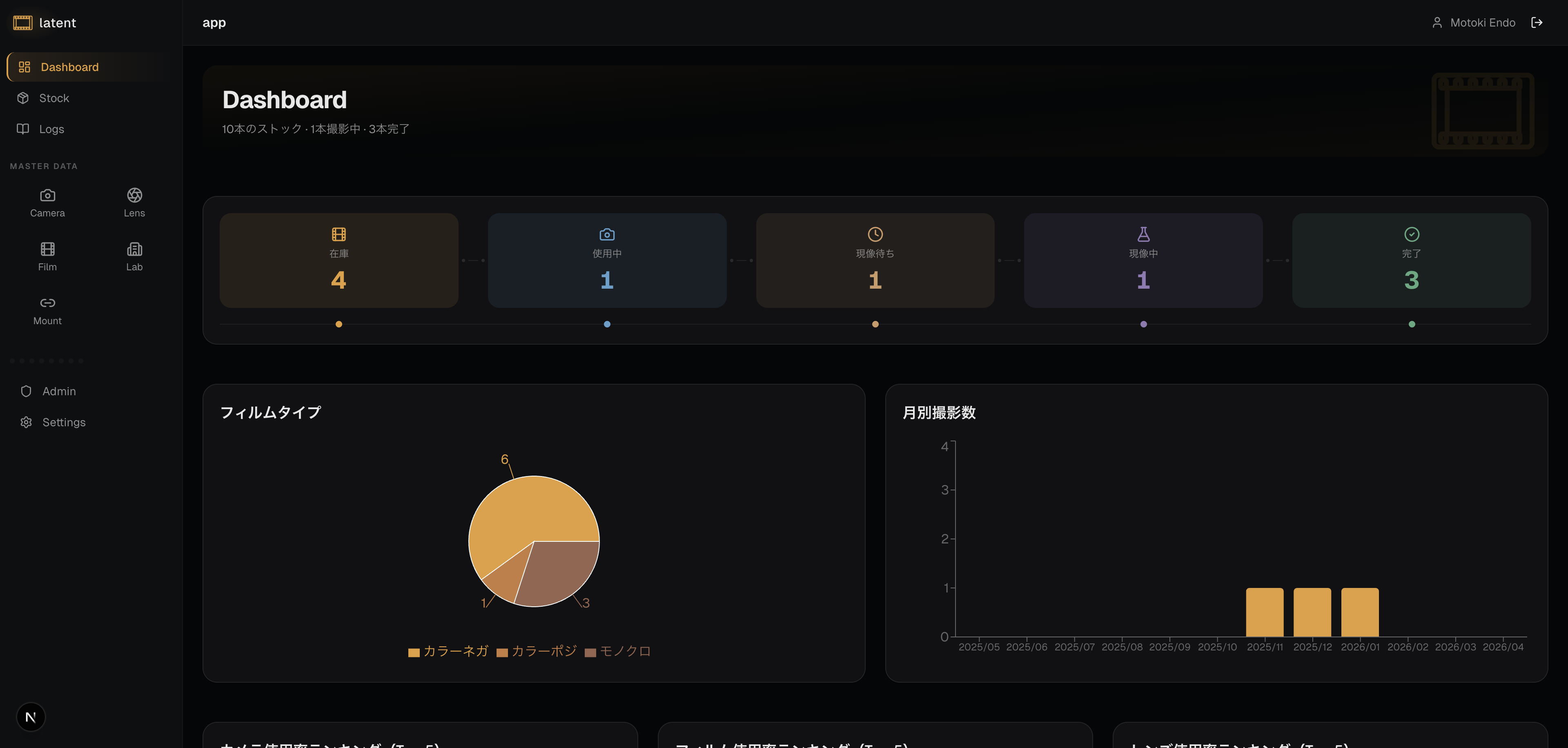
The Status Pipeline
At the top of the dashboard, a row of status cards shows how many film stocks are currently in each stage of the workflow:
- Available — rolls registered but not yet loaded
- In Use — rolls currently loaded in a camera
- To Development — finished rolls waiting to be sent to the lab
- In Laboratory — rolls currently being developed
- Done — completed rolls with shooting logs
Each card displays a count. Clicking a card takes you directly to the Stocks section filtered to that status, except for Done, which navigates to the Logs tab. This makes it easy to act on what you see.
If you notice five rolls sitting in the To Development column, a single click gets you to the list so you can plan your next lab drop-off.
A summary text also shows total stock count, in-use count, and completed count for quick reference.
Film Type Distribution
Below the status pipeline, a pie chart shows the breakdown of film stocks you have used by type: Color Negative, Color Positive, and Black and White.
This visualization helps you understand your own shooting tendencies. If you find that 80% of your rolls are color negative, you might decide to experiment more with black and white or slide film. The chart updates automatically as you add new stocks and complete more rolls.
Rankings
The dashboard displays three rankings based on usage count:
- Camera Ranking: Your most frequently used cameras
- Film Ranking: Your most frequently used film brands
- Lens Ranking: Your most frequently used lenses
These rankings help you understand your shooting habits and identify equipment or films you might want to try more often.
Monthly Activity
The monthly shots chart shows how many rolls you have completed each month over the past 12 months as a bar chart. This is a useful indicator of your overall shooting pace.
Use the monthly activity view to:
- Identify your most and least active months
- See whether you are shooting more or less than in previous periods
- Plan your purchasing based on expected usage
For example, if you consistently shoot more in spring and summer, you might want to stock up in February before your busy season begins.
Recent Logs
The lower section of the dashboard displays your most recently completed shooting logs. Click on any log entry to open its full detail view. This section is useful for:
- Picking up where you left off. If you have scans to upload or notes to add to a recent roll, the recent logs section gets you there immediately.
- Reviewing your latest work. Seeing your recent logs in one place makes it easy to reflect on what you have been shooting.
To see your full log history with filtering options, navigate to the Logs section from the main menu.
Using the Dashboard as a Daily Check-in
The dashboard works best when you treat it as a brief daily or weekly check-in rather than something to visit only when you need to update a record.
A quick look at the dashboard each time you open Latent can prompt useful actions:
- If In Use shows a roll you forgot about, it is a reminder to finish shooting or move it to the next stage.
- If To Development has been accumulating, it might be time to schedule a lab drop-off.
- If you notice a long gap in the monthly activity chart, it might motivate you to load a camera and get out to shoot.
The dashboard is intentionally lightweight — it shows you the summary and then gets out of the way so you can take action. Over time, as your log history grows, the charts and activity data become increasingly meaningful and satisfying to review. For a deeper look at managing your rolls, see the stock management guide. For everything you can do with a completed roll, see the shooting log guide.